Table of Contents
Overview
After restoring your workloads, Active Directory may not be accessible because all domain controllers are stuck in Directory Services Restore Mode or DSRM. This article will guide you through forcing an authoritative restore to bring the domain back online.
Authoritative SYSVOL restore (DFSR service used)
- Wait for the restored VM to go through its boot cycle. Because the VM is running domain roles, it will need to reboot towards the end of the first boot.
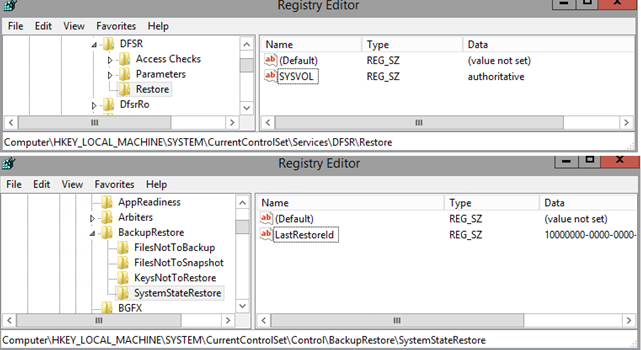
- When booted the second time, navigate to HKLM\System\CurrentControlSet\Services\DFSR registry hive, create a key Restore and create SYSVOL string with the value authoritative.
This value is read by the DFSR service. If this value is not set, the SYSVOL restore is performed non-authoritatively by default. - Navigate to HKLM\System\CurrentControlSet\Control\BackupRestore, create a key SystemStateRestore and create a LastRestoreId string with any GUID value. (Example: 10000000-0000-0000-0000-000000000000).
- Restart DFSR service.
Authoritative SYSVOL restore (old FRS service used)
- Wait for the restored VM to go through its boot cycle. Because the VM is running domain roles, it will need to reboot towards the end of the first boot.
- When booted the second time, navigate to HKLM\System\CurrentControlSet\Services\NtFrs\Parameters\Backup/Restore\Process at Startup registry hive and change the value of the key Burflag to 000000D4 (hex) or 212 (dec).
This effectively forces the Domain Controllers still using the old FRS technology to start the replication in an authoritative mode. More details about FRS recovery. - Restart the NTFRS service.
Additional Resources
For more information, you can read the relevant Veeam KB by clicking here.